Copy an Instagram post link
Copy a public post or Reel URL from Instagram.

Paste a supported public link to begin.
Paste a link, then choose Download.
Save photos, videos, Reels, and carousel images from public Instagram posts. Paste the post link and choose the available files.
https://www.instagram.com/p/example/https://www.instagram.com/reel/example/Choose another DLPanda downloader for public media links, videos, photos, reels, and clips.
Start with a public post or Reel link. Each returned image or video has its own save option.
Copy a public post or Reel URL from Instagram.
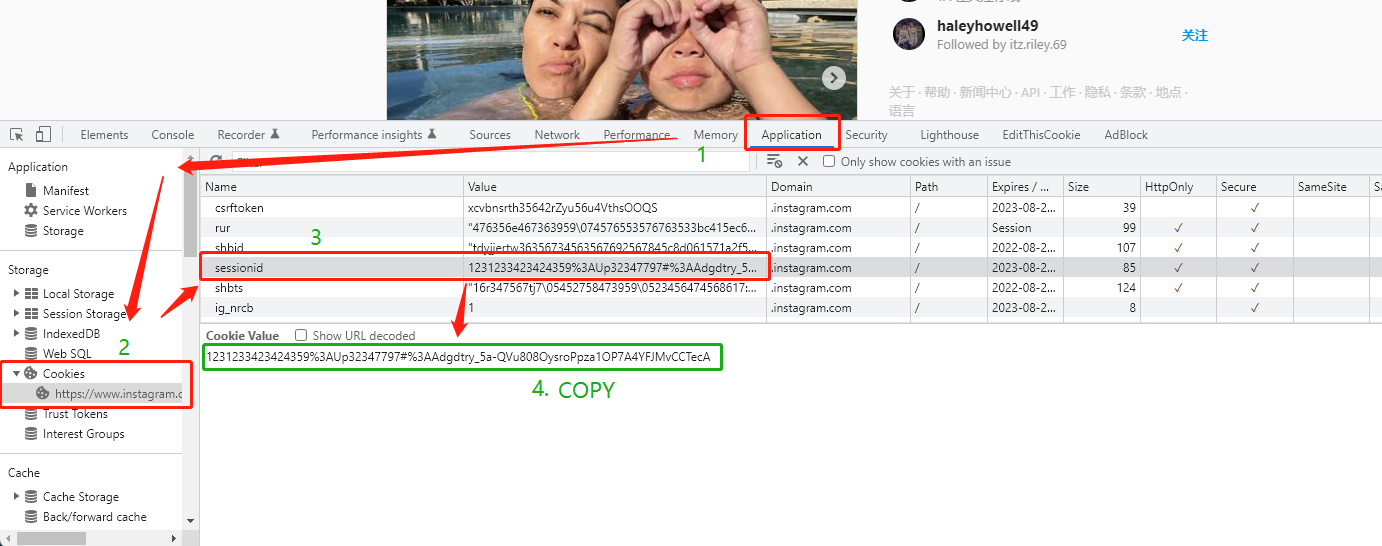
Paste the URL. A session cookie is optional and should be used only for content you can access.
Use the video or individual image actions shown for the post.
Save photos, videos, Reels, and carousel images from public Instagram posts. Paste the post link and choose the available files.
Prepare accessible video files from public Instagram posts and Reels.
List individual images when the parsed post contains a photo carousel.
Public links should be tried first; sessionid is only for media your account can view.
Quick answers for common parsing and saving questions.
Use the URL of a public Instagram post or Reel, such as instagram.com/p/… or instagram.com/reel/…. A profile link does not identify a single post. This page does not promise access to private accounts, Stories, or restricted posts.
When the post returns multiple images, each one appears with an individual save action. Check the previews and save the pictures you want. A carousel may mix photos and videos, so the available download options can differ between items.
Try the public post link first. The form includes an optional sessionid field for cases where public access fails. It is a login credential: use only your own session and only for content you are authorized to access. Some posts may remain unavailable.
Check that the Reel still opens at its original URL and copy a fresh link. Removed, private, age-restricted, or region-restricted posts may fail. If Instagram temporarily limits access, wait before retrying instead of submitting the same link repeatedly.
Open the prepared image link. On iPhone, use the image’s Share or touch-and-hold save menu when available. On Android, touch and hold the image and choose Download image. If it downloads as a file, check Files or your browser’s Downloads list.
I want to download pictures of the private account, so. How to download instagram private account videos and photos? Use dlpanda.com to download any post of any account even the private account ( your account needs follow the private account first )
Read more