
You have a video or a few photos to save. You paste a link, try the download, and somewhere along the way think: “I wish this worked a little differently.” That is exactly the kind of thing we want to hear.
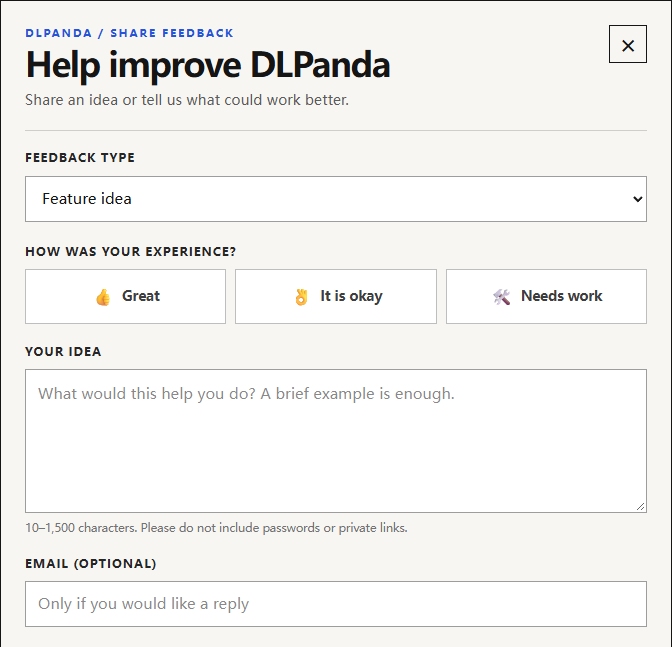
DLPanda's feedback form lets you suggest features, request support for more platforms or content types, and report anything that gets in your way. Open DLPanda and choose Share feedback above the download input or at the bottom of the page. You do not need an account, and leaving an email address is optional.
Tell us what you were trying to do
A useful suggestion does not need to be a product specification. Start with the task. Were you saving a set of images? Trying to find a file on your phone? Looking for a tool for a platform we do not support?
For example, a request could be:
“I only need three photos from a longer post. Could I select those photos and download them together?”
That is an example of a feature request, not a claim that selection and batch downloading are available. It tells us both what you want and why it would help.
The form has five topics. Pick the closest one:
- Feature idea: a new capability that would help you finish a task.
- Ease of use: a step that takes too long or leaves you guessing.
- New download support: a platform or kind of content you would like to save.
- Problem report: an error, an unresponsive button, or an unexpected result.
- Other: anything that does not fit neatly into those topics.
A few details can save a lot of guesswork
If something went wrong, tell us what you clicked, what happened next, and what you expected instead. Your device and browser can help too. “On my phone, Download opens a preview and I do not know how to save it” gives us more to work with than “downloads are confusing.”
For a download request, name the platform and the content type. You can paste a public example link into your message. Please leave out passwords, verification codes, and private links.
Choose a topic and an experience rating, then write 10–1,500 characters. Add an email address if you would like us to be able to follow up, complete the security check, and click Send feedback. A confirmation message means your feedback was received. If verification expires or sending fails, follow the message and try again.
Sending a request does not put a feature on a release schedule. It gives us a concrete use case to consider. An email address also does not guarantee an individual reply or a fixed response time.
Know someone who could use DLPanda?
If DLPanda has made a task easier for you, sharing it with someone who needs it is the best support you can give us.
There is no need for a polished recommendation. A link and “this helped me save those photos” is plenty. Share dlpanda.com, or send the specific tool page you used. Your honest experience is more useful than a sales pitch.
And if there is a reason you would hesitate to recommend it, we would like to hear that too.
Cannot find the feedback link?
The Share feedback button is also in the footer. Dismissing the reminder above the download input normally hides that reminder in the same browser for 30 days; it does not remove the footer button.
Thanks for taking a moment to tell us what would make DLPanda work better for you.